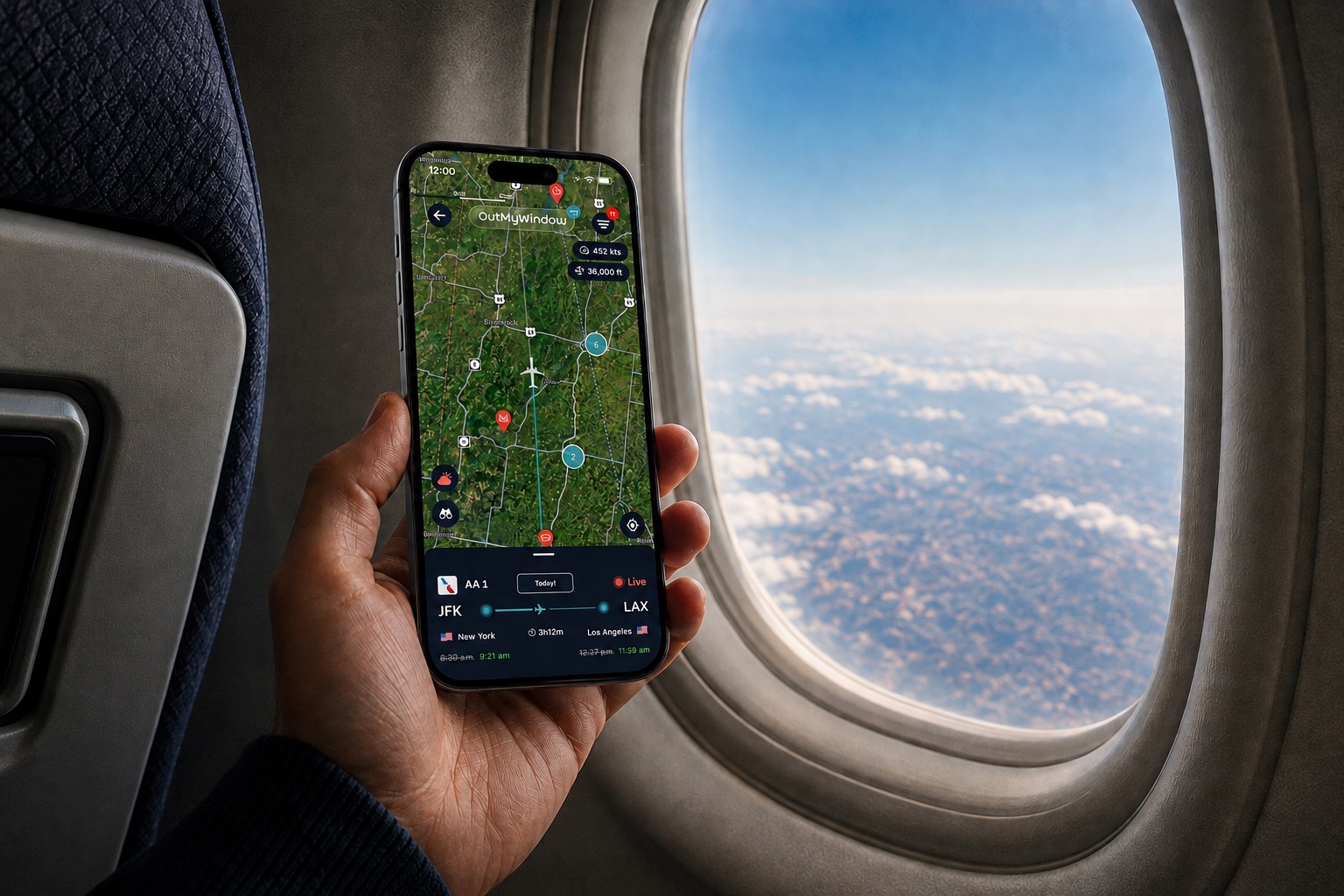

The In-Flight App for the Curious

OutMyWindow is a live in-flight map that shows what you're flying over in real time.

The Core Experience


When you open OutMyWindow during a flight, you’re instantly shown a live map of what you’re flying over. Cities, landmarks, and points of interest appear beneath your route in real time — turning a glance out the window into a moment of discovery.

1. Start with a Live View

Open the app mid-flight and see exactly where you are and what’s below you. Your plane’s position updates in real time, revealing cities, stadiums, national parks, racetracks, and more as they pass beneath your window.

2. Follow the World Below

As you continue flying, the map updates alongside your journey. Upcoming points of interest appear ahead of you, and alerts let you know exactly when — and which side of the plane — to look so you never miss something worth seeing.

3. Keep Exploring After Landing

Once you land, your flight doesn’t disappear. OutMyWindow saves your journey so you can revisit the route you took, explore the landmarks you passed, and build a personal record of the places you’ve flown over.

Why You’ll Love Flying With Us


Live In-Flight Map View

Track your plane in real time with precise ADS-B or GPS data — complete with 100,000+ points of interest plotted along your route.

WiFi-First, Offline Optional

Designed for in-flight WiFi, with an experimental GPS-only mode available when you’re offline.

Time & Side Alerts

Get clear alerts for exactly when — and which side of the plane — to look for the best view of each landmark.

Flight Path Previews

Before takeoff, explore recent flight paths for your route and see the landmarks you’re likely to spot along the way.

Personal Flight History

Relive every journey with a saved record of your path, the landmarks you passed, and the views from your seat.

What Makes Us Different


OutMyWindow was built by a traveler who just wanted to know what they were seeing outside the window.

1. Clean and Digestible

Seatback maps (when they exist) are vague. Google Maps wasn’t designed for use at altitude. Flight trackers provide live data, but bury you in a sea of data and offer little context about what you’re actually flying over.OutMyWindow takes a different approach — a clear, live map that shows your plane and the places below it, without the clutter.

2. WiFi-First by Design

OutMyWindow bets on the future of in-flight WiFi — faster, more reliable, and more available every year. With a connection, you get a rich, real-time experience powered by live flight data. An experimental GPS-only mode is available for travelers who want to explore without WiFi.

3. Built for the Window Seat

OutMyWindow is built for people who care about the view — before, during, and after a flight. Use it to choose the best side of the plane, follow the world below in real time as you fly, and revisit your journey long after you’ve landed.


From the Window Seat


Here’s what travelers like you are excited about — even before we’ve officially taken off.

“Knowing when and where to look out the window is a game changer.”

– Someone Who Loves the Window Seat

“I finally know what I’m flying over instead of just guessing.”

– Inspired Traveler

“This is exactly what I’ve always wanted while flying.”

– Frequent Window Seat Flyer

See OutMyWindow in Action


Watch how OutMyWindow shows what you’re flying over in real time during a flight.

Choose Your Flight Plan


Use OutMyWindow free — upgrade only when you want more.

Premium Subscription

•    $5.99/month or $49.99/year
•    Unlimited flights, unlimited map check-ins
•    No ads
•    All points of interest unlocked
•    Early access to new features
•    Best value for frequent flyers
•    Free OutMyWindow T-Shirt for First 200 Annual Subscribers *

Premium Day Pass

•    $3.99 for 24 hours
•    Unlimited map check-ins for 1 day
•    No ads
•    All points of interest unlocked
•    Ideal for occasional travelers

Free

•    Always free
•    3 map check-ins per flight
•    Interstitial ads
•    Basic points of interest only
•    Great for casual use

* - Click here for more info on the OutMyWindow t-shirt offer


Early Boarding is Underway


Be among the first to experience OutMyWindow. Enter your email and we’ll let you know the moment we take off.

Privacy Policy

Last Updated: September 2025OutMyWindow™ (“we,” “our,” or “us”) values your privacy. This Privacy Policy explains how we collect, use, and protect your information when you visit our website and join our waitlist.OutMyWindow™ is operated by x8 Data Company, LLC.1. Information We CollectWhen you join our waitlist, we collect:
Email address – to notify you when the app launches and share occasional updates.
We may also automatically collect:
Non-personal information – such as browser type, device type, and general location (via analytics tools like Google Analytics).
2. How We Use Your InformationWe use your information to:
• Notify you when OutMyWindow launches.
• Send occasional updates about our progress.
• Improve our website experience.
We will never sell, rent, or share your email address with third parties for marketing purposes.3. How We Protect Your InformationWe use reasonable administrative, technical, and physical safeguards to protect your information. However, no method of transmission over the internet is completely secure, and we cannot guarantee absolute security.4. Your RightsDepending on where you live, you may have the right to:
• Request a copy of the personal information we have about you.
• Request that we delete your personal information.
To exercise these rights, email us at [email protected].
5. Third-Party ServicesOur website may use third-party services (e.g., Google Analytics) that collect, monitor, and analyze non-personal information to help us improve our website.6. Changes to This PolicyWe may update this Privacy Policy from time to time. The updated version will be posted on this page with the “Last Updated” date at the top.7. Contact UsIf you have any questions about this Privacy Policy, contact us at:
[email protected]

Terms & Conditions

Last Updated: August 2025Welcome to OutMyWindow™ (“we,” “our,” or “us”). These Terms & Conditions (“Terms”) govern your use of our website and participation in our waitlist. By accessing our website or joining our waitlist, you agree to these Terms.OutMyWindow™ is operated by x8 Data Company, LLC.1. Use of Our WebsiteYou agree to use our website only for lawful purposes and in a way that does not infringe on the rights of others or restrict their use and enjoyment of the site.2. Waitlist Sign-UpWhen you join our waitlist, you agree to provide accurate and current information, including a valid email address. We will use this email to notify you about our app launch and related updates.3. Intellectual PropertyAll content on our website — including text, graphics, logos, and images — is the property of OutMyWindow™ and is protected by applicable copyright, trademark, and other intellectual property laws. You may not use, reproduce, or distribute our content without our written permission.4. No WarrantyOur website and its content are provided “as is” without warranties of any kind, either express or implied. We do not guarantee that the website will be available without interruption or free from errors.5. Limitation of LiabilityTo the maximum extent permitted by law, OutMyWindow™ is not liable for any damages arising from your use of our website or participation in our waitlist.6. Third-Party LinksOur website may contain links to third-party websites. We are not responsible for the content, policies, or practices of those websites.7. Changes to These TermsWe may update these Terms from time to time. The updated version will be posted on this page with the “Last Updated” date at the top.8. Contact UsIf you have questions about these Terms, contact us at:
[email protected]

OutMyWindow T-Shirt Offer


✈️ Love the window seat? Wear it proudly.To celebrate our launch, we’re giving an OutMyWindow t-shirt to our first 200 users who purchase the Premium annual subscription ($49.99).---🎽 What You Get- A soft, Comfort Colors tee with the OutMyWindow logo + fun window design on the back
- Ships free to all U.S. addresses
- Available in multiple sizes
- One shirt per user
---🛒 How It Works1. Purchase the Premium annual subscription inside the app ($49.99)
2. You'll get an email to claim your shirt after purchase
3. Enter your shirt size and shipping address
4. Sit back and relax — your shirt is on its way
---🚨 Limited to the First 200 Premium Annual SubscribersThis is a launch exclusive — only the first 200 people to purchase a Premium annual subscription will receive a shirt. After that, the offer will be marked as sold out.---🌍 Shipping Info- Free shipping within the U.S.
- International shipping available, but additional fees may apply
- We’ll email you with options if you're outside the U.S.
- Shirts ship within 1 week of claiming your reward
---🧾 Fine Print- Offer valid while supplies last
- One t-shirt per customer
- You must submit a valid shipping address and t-shirt size after purchase
- No substitutions, exchanges, or cash value
- Subject to change or cancellation at any time
---🤔 Questions?Email us at [email protected]

We’re Building Something New — From 35,000 Feet.

The OutMyWindow Beta is your chance to help test and refine a new kind of travel experience, one flight at a time.

What is OutMyWindow?


OutMyWindow is a real-time flight tracking app built specifically for people in the window seat.

It uses live flight data, GPS, and a global database of landmarks to show you exactly what you’re flying over, right from your seat. Cities, parks, mountain ranges, stadiums. Each one identified in real time with rich context and visuals.

Want to know more about the app? Check out the OutMyWindow home page.

What the Beta Includes


What You'll Get:
•    Early access to the iOS app
•    Add your flights and see real-time POIs as you fly
•    Access to your past flights and what you passed over
•    Direct line to the founders for feedback and feature shaping
•    Up to one year of free Premium subscription to the app

Who We're Looking For


We're looking for travelers who:
•    Sit by the window and wonder what’s below
•    Fly in the next 4–6 weeks
•    Are willing to take short surveys after each flight
•    Want to help shape something new
•    Use iPhone

How to Join


Tap the button below to fill out a short form about your travel plans. If accepted, we’ll email you with everything you need before your next flight.

OutMyWindow Beta Quickstart Guide


Welcome to the OutMyWindow Beta — we’re thrilled to have you onboard. This Quickstart Guide will walk you through everything you need to get up and running: from installing the app and adding your first flight, to understanding how the experience works in the air and how to share feedback. It’s all here to make sure you’re ready to explore the world from above and help shape what OutMyWindow becomes.

Getting Started with TestFlight


Step 1:
Install the TestFlight app from the App Store if you haven’t already. TestFlight is an app created by Apple that developers use to test their apps before release.
Step 2:
Check your inbox for an invite from Apple TestFlight. It’ll come to the Apple ID email you submitted in the beta form and will reference joining the OutMyWindow Beta.
Step 3:
Open the invite email and tap the link to install OutMyWindow via TestFlight. The OutMyWindow app will be added to your home screen.
Make sure you’re on the same device connected to that Apple ID account.

Creating Your OutMyWindow Account


When you open the app for the first time and after you've been shown the app walkthrough, you’ll need to create an account so we can keep track of Beta activities.• Click on the Settings icon (a gear) in the top right corner.
• Choose to create your account using Google or Apple Single Sign-On and go through the process of giving OutMyWindow approval with your chosen service.
• This will let you save your flights, track history, and receive Premium credit for Beta feedback.
📌 We’ll never share your info. It’s just for the Beta and flight tracking.

Adding Your First Flight


Once you’re in the app:1. Tap into the “Search to add your flight” text entry box
2. Enter your flight information. You can search by flight number (i.e. AA123) OR searching between the two airports (i.e. LAX + DFW)
3. Choose your departure date
4. This will show you all flights on your departure date that match your criteria
5. Tap on the Flight Card for your flight and it will automatically be added to your Upcoming flight list on the home screen
✈️ You can add multiple upcoming flights if you’ve got a busy schedule.

The OutMyWindow Experience


🛫 Pre-Flight:
Before you board, open the app and check your flight preview by clicking on the Flight Card in the Upcoming flight list. You’ll see the five most recent routes for your flight. Use the Filters and Points of Interest list to get a feel for what amazing things you might fly over and even choose what side of the plane you'll sit on.
✈️ In the Air:
HERE
HERE
HERE
Once in-flight, open the app to see your real-time position and upcoming points of interest.
Depending on your WiFi access:
• Premium WiFi: You’ll get precise live tracking.
• Limited or No WiFi: The app will switch to using your phone’s GPS.
🛬 Post-Flight:
After landing, your flight is saved. You can revisit what you passed over, review points of interest, and view the full route.
🚨 If you ever lose connection or can’t get a GPS lock, don’t stress — that’s part of what we’re testing.

How the Beta Works


Step 1:
Install the TestFlight app from the App Store if you haven’t already. TestFlight is an app created by Apple that developers use to test their apps before release.
Step 2:
Check your inbox for an invite from Apple TestFlight. It’ll come to the Apple ID email you submitted in the beta form and will reference joining the OutMyWindow Beta.
Step 3:
Open the invite email and tap the link to install OutMyWindow via TestFlight.

How to Send Feedback


Step 1:
Install the TestFlight app from the App Store if you haven’t already. TestFlight is an app created by Apple that developers use to test their apps before release.
Step 2:
Check your inbox for an invite from Apple TestFlight. It’ll come to the Apple ID email you submitted in the beta form and will reference joining the OutMyWindow Beta.
Step 3:
Open the invite email and tap the link to install OutMyWindow via TestFlight.